The audit scramble is a symptom, not a problem
Every compliance team knows the feeling. The audit window opens in two weeks. The auditor sends an evidence request list with 80 items. You start scrambling: pulling screenshots, exporting logs, chasing down policy acknowledgments, and reformatting everything into a folder structure that makes sense.
You spend 40+ hours collecting evidence that should have been collecting itself all along.
The scramble isn't the problem. The problem is that evidence collection is still a manual, periodic activity instead of a continuous, automated process. Fix the pipeline and the scramble disappears.
What compliance evidence actually is
Evidence is proof that your security controls are operating as intended. It's the artifact that connects your documented policies to your actual operations. Auditors don't take your word for it; they want receipts.
Common evidence types:
- Configuration screenshots: firewall rules, encryption settings, access control configurations
- Log exports: authentication logs, change management logs, incident response timelines
- Policy acknowledgments: signed records that employees read and accepted security policies
- Access reviews: periodic exports showing who has access to what, and that it was reviewed
- Vulnerability scans: reports from Tenable, Qualys, or Rapid7 showing scan coverage and findings
- Training records: completion certificates from security awareness training platforms
- Vendor assessments: completed questionnaires and certification documents from third parties
Each piece of evidence maps to one or more control requirements across your compliance frameworks. A single access review export might satisfy SOC 2 CC6.1, ISO 27001 A.9.2.5, and HIPAA 164.312(d) simultaneously.
Why manual evidence collection fails
It doesn't scale
If you have one framework and 50 controls, manual collection is painful but possible. Add a second framework and you have overlapping controls, but also twice the evidence burden. By the time you're managing SOC 2, ISO 27001, and HIPAA simultaneously, manual collection is a full-time job.
Evidence goes stale
A screenshot from six months ago doesn't prove your controls are operating today. Auditors want evidence from within the audit period. If you only collect evidence before audits, you have coverage gaps that are hard to fill retroactively.
It creates key-person risk
When one person knows where all the evidence lives, how to export it, and how to format it, your entire compliance program is one resignation away from chaos. Automated collection removes the dependency on institutional knowledge.
It's error-prone
Manual processes inevitably miss things. A control gets added but nobody adds it to the evidence checklist. A new integration goes live but nobody exports its logs. An employee leaves but their access review evidence isn't updated. Automation catches what humans forget.
Building an automated evidence pipeline
Step 1: Map your evidence requirements
Before you automate anything, you need a clear map of what evidence you need, which controls it satisfies, and where it comes from.
For each control in your framework:
- What evidence proves this control is operating?
- What system or tool produces that evidence?
- How often does it need to be refreshed?
- Who is responsible for reviewing it?
This mapping is the foundation. Without it, automation just collects random artifacts faster.
Step 2: Connect your security tools
The highest-value automation comes from direct integrations with the tools that produce evidence naturally as part of their normal operation.
High-impact integrations:
| Tool Category | What It Produces | Frameworks It Satisfies |
|---|---|---|
| Cloud providers (AWS, Azure, GCP) | Configuration compliance, encryption status, access policies | SOC 2, ISO 27001, NIST |
| Identity providers (Okta, Entra ID) | Access reviews, MFA status, provisioning logs | SOC 2 CC6, ISO 27001 A.9, HIPAA 164.312 |
| Vulnerability scanners (Tenable, Qualys) | Scan reports, remediation timelines, coverage metrics | SOC 2 CC7, ISO 27001 A.12, NIST DE |
| SIEM platforms (Splunk, Sentinel) | Incident logs, detection coverage, response timelines | SOC 2 CC7, ISO 27001 A.16, NIST DE/RS |
| Ticketing systems (Jira, ServiceNow) | Change management records, remediation tracking | SOC 2 CC8, ISO 27001 A.12.1 |
| Training platforms (KnowBe4, Proofpoint) | Completion records, phishing simulation results | SOC 2 CC1, ISO 27001 A.7, HIPAA 164.308 |
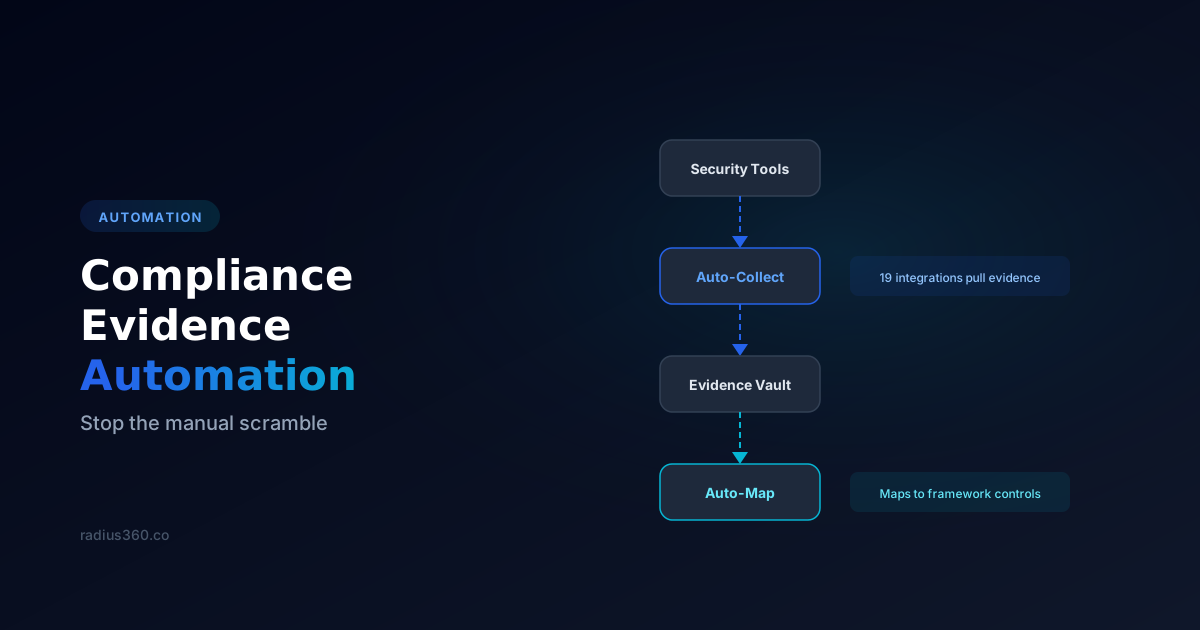
Each integration pulls evidence automatically on a schedule: daily, weekly, or in real-time depending on the tool. The evidence arrives already timestamped and ready for audit.
Step 3: Auto-map evidence to controls
Collecting evidence is only half the battle. The other half is mapping it to the specific controls it satisfies. Without mapping, you have a pile of artifacts and no way to know which controls are covered and which have gaps.
Cross-framework mapping is where the real efficiency gain happens. When a single Okta access review export automatically maps to SOC 2 CC6.1, ISO 27001 A.9.2.5, and HIPAA 164.312(d), you've eliminated three manual steps with one automated action.
Step 4: Set expiration alerts
Evidence has a shelf life. An access review from January doesn't satisfy an auditor looking at Q3 controls. Set automatic alerts for when evidence is approaching expiration (14 days before is a good default) so you can refresh it before it goes stale.
This is especially critical for:
- Quarterly access reviews
- Annual penetration tests
- Vendor certification renewals
- Policy acknowledgment cycles
Step 5: Build a continuous compliance dashboard
Once evidence flows automatically and maps to controls, you can build a real-time view of your compliance posture. At any point, you should be able to answer:
- What percentage of controls have current evidence?
- Which evidence is expiring in the next 30 days?
- Which controls have no evidence at all?
- Which frameworks have the biggest gaps?
This dashboard turns compliance from a periodic scramble into a continuous, measurable process. When an auditor asks for evidence, you don't search for it, you hand them the dashboard.
What audit-grade evidence actually means
"We have a screenshot" and "we have evidence an auditor will accept" are different claims. Audit-grade evidence has four properties, and automation only helps if it preserves all four:
Provenance. The artifact says where it came from and how. An export pulled by an API integration carries its source system and collection method; a screenshot in a shared drive carries whatever the filename says. When an auditor asks "how do I know this is from your production Okta tenant," provenance is the answer.
Period. Evidence proves a control operated during the audit window, not at some point in history. A SOC 2 Type II audit examines operating effectiveness across the whole period, which means point-in-time artifacts from outside the window are worthless and a continuous collection cadence is not a luxury.
Population and sampling. For recurring controls, auditors do not want one example, they want to know the full population (every access review, every change ticket, every offboarded user) so they can sample from it. Evidence that arrives with its population size attached lets the auditor sample instead of asking you to prove the pile is complete. This is the single most common gap between "we collect evidence" and "our audit went smoothly."
Timestamped immutability. Evidence collected at the time the control operated, stamped then, beats anything reconstructed later. If your pipeline timestamps artifacts on arrival and never edits them in place, disputes about when something was true simply do not come up.
If you take one phrase into your next platform evaluation, make it this: ask the vendor how their evidence holds up under sampling. The demo always shows the green dashboard; the audit tests the population behind it.
Manual vs automated collection, honestly compared
| Manual collection | Automated pipeline | |
|---|---|---|
| Effort per framework added | Scales linearly (or worse) | Marginal, since cross-framework mapping reuses artifacts |
| Evidence freshness | As old as your last sprint | Continuous, on the integration's sync cadence |
| Period coverage (Type II) | Gaps wherever collection lapsed | Full-window by default |
| Population completeness | Depends on the checklist being right | Defined by the integration's scope |
| Provenance | Filename conventions and trust | Source system and method attached to each artifact |
| Key-person risk | High: the process lives in someone's head | Low: the pipeline is the process |
| Judgment-dependent evidence (vendor reviews, tabletop exercises, physical security) | Same effort either way | Same effort either way; automation does not do judgment |
That last row matters. Automation clears the mechanical eighty percent so your practitioners can spend their hours on the evidence that genuinely requires a human: risk acceptances, vendor assessments, incident post-mortems, exception reviews.
Not all automated evidence is equal
Platforms differ sharply in how they map a collected artifact to the controls it satisfies, and the difference shows up in audit quality:
Explicitly mapped evidence comes from integrations where each finding type is deliberately mapped to specific controls: this MFA-coverage export satisfies SOC 2 CC6.1 and ISO 27001 A.9.4.2, because someone read both control texts and made the call. The mapping is auditable and the coverage claim is defensible.
Keyword-matched evidence comes from pipelines that match artifact text against control language automatically. It is better than nothing and useful for breadth, but it produces both false coverage (an artifact "matching" a control it does not actually satisfy) and missed coverage. Treat keyword-matched coverage as partial and verify it before an audit relies on it.
When you evaluate platforms, ask which mapping method backs each integration. A vendor that cannot answer per-integration is telling you the answer.
What each framework actually expects
SOC 2 Type II is the freshness-and-sampling test: controls must operate across the entire period, auditors sample recurring controls from full populations, and a collection gap in month four becomes a finding in month twelve.
ISO 27001 adds the surveillance-audit rhythm: certification is followed by annual surveillance, so evidence collection that spikes before the certification audit and dies afterward gets caught in year two. Continuous pipelines are how certified organizations stay certified.
CMMC assessments look for objective evidence against each practice, and assessors expect artifacts, screenshots with dates, exports, and policies with revision history rather than attestations. Defense contractors preparing for Level 2 should treat evidence automation as assessment-prep infrastructure, not convenience. Our CMMC Level 2 guide covers the practice-by-practice expectations.
Cyber insurance is the quiet fourth framework: renewal questionnaires increasingly ask for proof, not attestation, and underwriters have started requesting the same artifact types auditors do. The 2026 renewal questionnaire breakdown shows the overlap.
Choosing an evidence automation platform: seven questions
- Which of my actual tools does it integrate with, and how deeply? A logo wall is not an answer. Ask what artifact types each integration produces and how each maps to controls.
- Does one artifact satisfy controls across all my frameworks at once? Cross-framework mapping is the entire economic case; without it you have automated single-framework collection.
- What happens when evidence expires? Alerts before expiration, and a visible gap when it lapses, not a dashboard that stays quietly green.
- Can it show population, not just presence? Sampling-ready evidence is what separates audit-grade from screenshot-grade.
- How does it handle the manual evidence that remains? Vendor reviews and training records need a workflow too; the pipeline should hold both.
- What does the auditor actually receive? Ask to see the export: per-control evidence bundles with timestamps and provenance, or a folder of files someone still has to narrate.
- Does a human stay accountable? Evidence supports decisions someone signs. Platforms that auto-close findings without review generate audit trails no one stands behind, which auditors and boards are increasingly unwilling to accept.
Measuring the ROI of evidence automation
The business case for automation is straightforward:
Time savings: Do the arithmetic on your own numbers. Count the items on your last auditor evidence-request list, and mark how many were exports or configurations from systems you already run (cloud, identity, scanners, ticketing). For most teams that is two-thirds or more of the list, and it is exactly the portion integrations can produce continuously. If collection consumed 200 hours last cycle, the recoverable share is whatever fraction of those items came from connectable systems.
Reduced audit findings: Automated, continuous evidence collection eliminates the gaps that manual processes miss. Fewer gaps mean fewer audit findings, faster certification, and lower remediation costs.
Scalability: Adding a new framework (PCI DSS on top of SOC 2, for example) doesn't proportionally increase the evidence burden. Cross-framework mapping means existing evidence satisfies new requirements automatically.
Lower personnel risk: When evidence collection isn't dependent on one person's knowledge, you can handle team transitions without losing compliance continuity.
Getting started today
You don't need to automate everything at once. Start with the integrations that produce the most evidence across the most controls. For most organizations, that's your identity provider, cloud platform, and vulnerability scanner.
Connect those three tools, map their outputs to your framework controls, and set expiration alerts. That single step will automate 30-40% of your evidence collection. Then add integrations incrementally as your program matures.
The goal isn't perfect automation on day one. The goal is never scrambling before an audit again.
See how Radius360 helps
Put these ideas into practice with the right tooling.
See Automated Evidence Vault